At 9:05 a.m., the queue is already climbing.
A customer starts in chat, then switches to email, then calls. An agent picks up, but they do not have full context. They ask the customer to repeat details. The customer is frustrated, and the agent is rushed. After the call, the agent has two more minutes of work: write notes, tag the case, update the CRM, and trigger a back office request. That “two minutes” repeats hundreds of times a day. It becomes hours.
Most contact centers do not struggle because people are not trying. They struggle because the work is split across too many tools, too many handoffs, and too many manual steps.
This is why “AI and automation” in the contact center should not start with tools. It should start with the work.
This article is a practical playbook. It breaks down where automation helps most, where it often fails, and how to roll it out safely so it holds up in production.
What “real transformation” looks like in a contact center
Real transformation is not “more bots.” It is fewer broken handoffs.
It looks like this:
• Customers do not need to repeat themselves.
• Simple requests get resolved faster.
• Agents spend more time on complex issues, not admin work.
• After call work becomes lighter and more consistent.
• Exceptions have a clear path, not a long email thread.
• Leaders can see what is happening and why.
This is not a nice to have. It is the foundation for service levels, compliance, and cost control.
[Image: A simple “before vs after” workflow showing fewer handoffs | Alt: Contact center workflow before and after automation ]
Step one: Map the work, not the org chart
Most contact center projects start with channels. Chat. Email. Voice. WhatsApp.
A better start is to map one or two real workflows end to end.
Pick something common, like:
• “Where is my order?”
• “Change my address”
• “Cancel or refund”
• “Prescription status” (for regulated industries)
• “Account access issue”
Then map the steps across teams and systems.
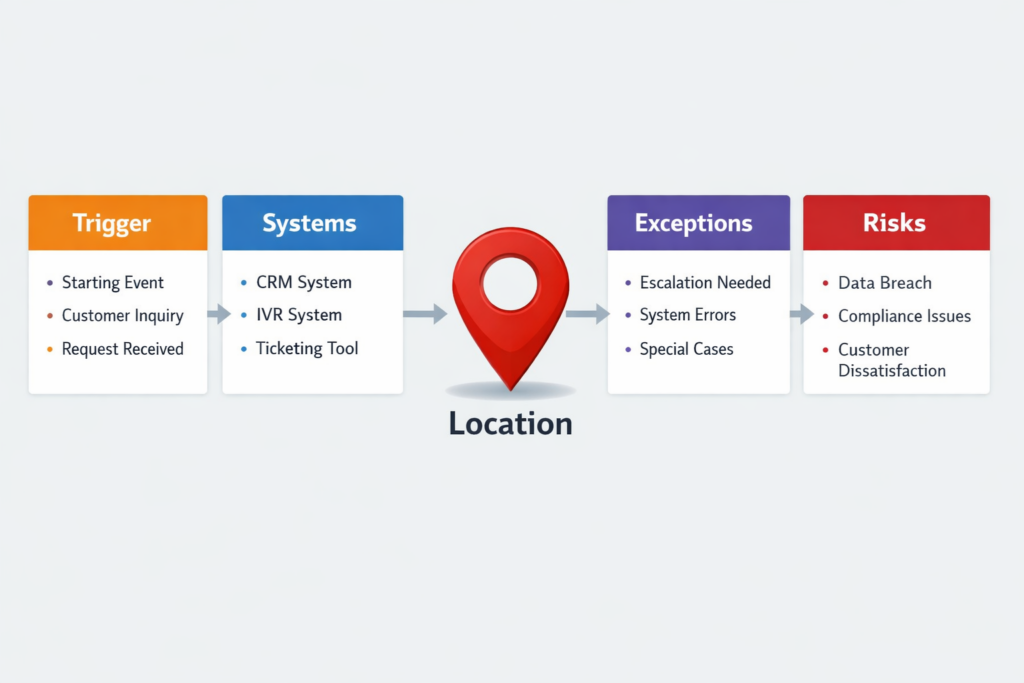
What to capture in a workflow map
Keep it simple. Capture only what is needed to design automation safely:
- Trigger
• What starts the request? A call, chat, email, form? - Systems involved
• CRM, order system, billing, knowledge base, identity tools. - Human decisions
• What decisions do agents make, and why? - Exception paths
• Missing data, policy edge cases, unclear intent, system downtime. - Risk points
• Any step that can cause compliance issues or customer harm.
When teams do this honestly, a pattern shows up fast: the biggest pain is often in “glue work.” That is the manual work between systems.
This is where automation creates real relief.
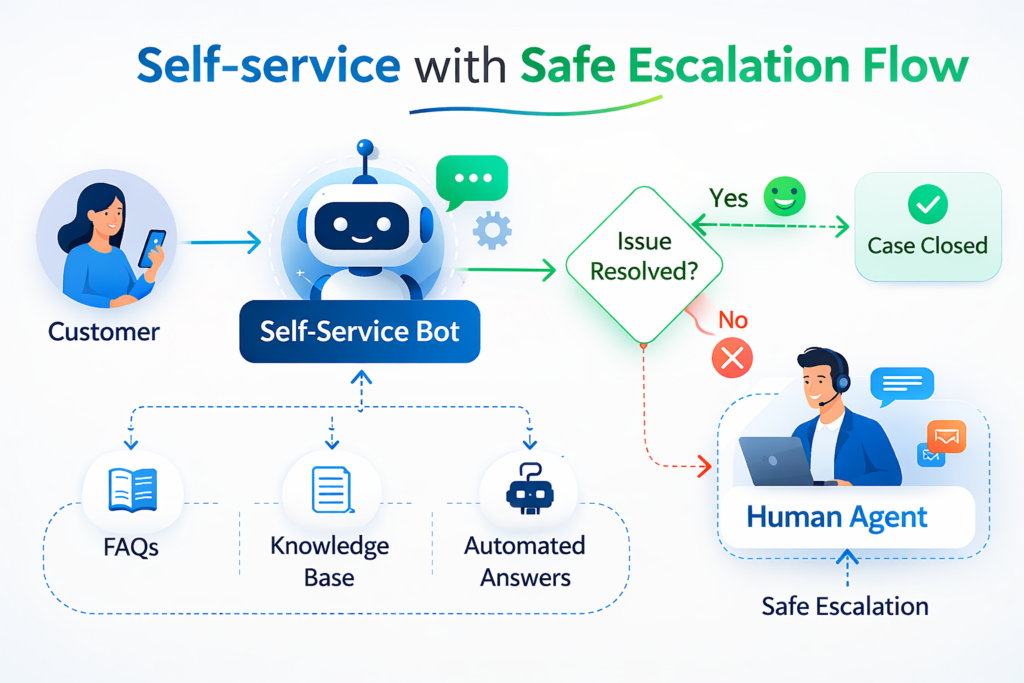
Self service that actually helps
Customers like self service when it works. It is faster and gives control.
But “self service” fails when it traps people. If a customer cannot reach a human, the experience gets worse.
A strong self service design has two parts:
- handle common tasks well
- escalate smoothly when needed
Gartner expects conversational AI to be a common starting point for customer service journeys in the coming years, which makes the quality of this layer even more important. (Gartner)
Where AI helps in self service
• Virtual agents for FAQs and common actions
o status checks, policy questions, basic troubleshooting
• Better knowledge search
o pulling the right article based on the customer’s words
• Smart forms
o asking fewer questions, but the right ones
What makes self service work in real operations
1) Clear containment
Containment means the customer got what they needed without escalation. Do not chase containment at all costs. Measure it, but protect CX.
2) Context preserved
If the customer escalates, the agent should see:
• what the customer tried
• what answers were given
• what data was collected
3) Escalation rules
Define triggers like:
• customer says “agent” or “human”
• the bot confidence is low
• repeated failure on the same step
• high risk intent (billing dispute, legal request, medical risk)
This “handoff design” is a big reason why many bot projects succeed or fail.
Contact management and routing: Send the work to the right place
Routing is not only “which agent gets the call.”
Routing is a full decision system:
• which channel is best
• which queue
• which priority
• which agent
• what should happen next
Modern contact centers use omnichannel routing to handle voice and digital interactions under one model. NiCE describes omnichannel routing as routing across channels like voice, chat, email, social, SMS, and self-service. (NiCE)
Where automation helps most
1) Intent detection
Even basic intent detection can reduce misroutes.
Example:
• “I want to change delivery address” should go to order workflow, not general support.
2) Skill-based routing
Match the request to the agent best equipped to solve it.
3) Priority rules
Certain customers or issues need faster handling.
Examples:
• regulated complaint
• account security
• high-value customer
• time-sensitive delivery issue
4) Real-time load balancing
When queues spike, routing needs to adapt without manual micromanagement.
NiCE also describes AI-powered routing as using real-time context to match customers to the right resolution path and improve outcomes like FCR and CSAT. (NiCE)
[Image: Routing decision tree showing intent, risk, priority, skill match | Alt: Contact center routing decision tree example ]
Agent assist: Reduce handle time without rushing the human
Most leaders talk about “deflection.” But many of the biggest wins come from supporting the human agent.
Agent assist is about giving the agent the right context at the right moment:
• customer details
• last interactions
• relevant policy
• next best steps
• draft responses
This reduces searching, reduces mistakes, and helps consistency.
The most useful agent assist patterns
1) Knowledge suggestions
Show the best answer or policy snippet during the interaction.
2) Guided workflows
Instead of a long checklist, guide the agent step by step.
3) Real time summaries
Summarize what the customer said so far, so transfers are smoother.
4) After call summaries
After call work is expensive and often inconsistent.
NiCE positions call summary automation as a way to reduce manual after-call work by generating structured summaries. (NiCE)
AWS also describes the operational benefit of call summarization, including better continuity and less repetitive admin work. (Amazon Web Services, Inc.)
A key point: agent assist should not feel like a second tool. It should show up inside the system agents already use.
[Image: Agent assist UI mock showing customer context and suggested steps | Alt: Agent assist view with context and next steps ]
After call work and back office automation: The hidden cost center
After every interaction, work continues:
• case notes
• tagging and categorization
• follow up emails
• CRM updates
• dispatching back office tasks
• updating customer records
This is where time disappears.
Automation here is often more reliable than front line automation because:
• the rules are clearer
• the systems are internal
• risk can be controlled with approvals
What to automate first in back office work
Start with tasks that are:
• repetitive
• rule based
• high volume
• easy to verify
Examples:
• create a ticket with correct category and required fields
• update a CRM status and next action
• generate a link or a pre filled form
• pull an order status and attach it to the case
• trigger a refund request with the right metadata
This is also where RPA can help when APIs are limited. CCaaS platforms and CRMs are not always fully connected. Sometimes a software bot is the simplest bridge.
[Image: Back office workflow showing ticket creation, CRM update, and task dispatch | Alt: After-call workflow automation example ]
How to adopt AI and automation without breaking service
Automation fails in contact centers for predictable reasons:
• it works in demos, not in real volume
• it ignores edge cases
• it has no owner after go live
• it cannot explain what it did
A safer rollout uses controls and a clear operating model.
A simple adoption checklist
1) Start with one workflow
Pick one high volume workflow and get it right.
2) Design the exception paths
Decide what happens when:
• data is missing
• confidence is low
• customer intent is unclear
• the action is high risk
3) Keep humans in the loop where needed
Human review can be built into steps like:
• approvals for refunds
• review for sensitive customer messages
• escalation for regulated issues
Human in the loop design is widely seen as a key pattern for safe AI operation, especially when systems can take actions. (Permit)
4) Make actions traceable
Teams should be able to answer:
• what happened
• why it happened
• what data was used
5) Measure outcomes, not vanity metrics
Do not only track “how many bots” or “how many automations.”
Track the outcomes tied to operations:
• time saved
• fewer repeats
• fewer exceptions
• faster resolution
[Image: Governance checklist with ownership, escalation, logging, measurement | Alt: Contact center automation governance checklist ]
Where a platform like NiCE CXone fits
Many contact centers run on CCaaS platforms.
CCaaS (Contact Center as a Service) is a cloud model for contact center tools across channels, often including voice, digital, analytics, and integrations. (Genesys)
NiCE positions CXone as a complete cloud contact center platform with routing, workforce optimization, analytics, and voice services. (get.niceincontact.com)
NiCE also provides modules such as omnichannel routing and workforce management under its CXone Mpower branding. (NiCE)
What to look for in any contact center platform
Use this as a simple evaluation list:
• Omnichannel routing across voice and digital
• Easy workflow configuration
• Integrations with CRM and core systems
• Workforce management support (forecasting, scheduling, intraday)
• Quality and analytics
• AI features that fit the workflow, not just “AI features”
• Security and compliance posture that matches your industry
A platform choice does not replace workflow design. It enables it.
This is why implementation and optimization matter as much as licensing.
[Image: Platform evaluation checklist for CCaaS | Alt: CCaaS platform evaluation checklist ]
A practical 90 day plan for contact center automation
Here is a simple plan that works for most teams.
Days 1 to 30: Choose the first workflow and design it
• pick one high volume workflow
• map systems, steps, and exception paths
• define escalation rules
• define success metrics
Days 31 to 60: Build and test with real cases
• build self service or agent assist components
• build back office automation where it saves real time
• test with real historical cases, including messy ones
• set up logging and review
Days 61 to 90: Roll out in phases and stabilize
• start with a small group of agents
• monitor and tune weekly
• tighten escalation rules
• document ownership and support
This is when most teams either build trust or lose it.
[Image: 30-60-90 day rollout timeline | Alt: Contact center automation rollout plan 30 60 90 days ]
Closing: The real value is in fewer seams
The contact center is where customers meet the business. It is also where broken workflows show up first.
AI and automation can drive real transformation, but only when they are built into production workflows with clear control:
• good routing
• safe self service
• strong agent assist
• lighter after call work
• clean back office steps
• traceable decisions
• a real operating model after launch
The best place to start is simple: pick one workflow, map the messy cases, and fix the seams that slow everyone down.
FAQs
1) What is contact center automation?
Contact center automation is the use of software, workflows, and AI to reduce manual steps in service operations. It can help with self service, routing, agent support, and back office tasks.
2) What is CCaaS?
CCaaS means Contact Center as a Service. It is a cloud based platform model for running contact center channels like voice and digital, with routing, analytics, and related tools. (Genesys)
3) Where should a contact center start with AI?
Start with one high volume workflow. Then add AI where it improves speed or consistency, such as triage, draft responses, knowledge search, or call summaries. Keep clear escalation rules for edge cases.
4) What is the difference between RPA and AI in the contact center?
RPA (Robotic Process Automation) automates repeatable steps across systems, often rule based. AI is useful for language heavy tasks, triage, and decision support. Many strong workflows use both.
5) How do you prevent AI from creating risk in customer service?
Use an operating model with controls: escalation rules, human review for high risk actions, traceability, and ongoing monitoring and tuning.
If you want, share the audience you want this to rank for (CX leader vs operations vs IT), and the primary keyword you want to target, and I can tighten the headline, section order, and FAQ set for SEO without adding fluff.