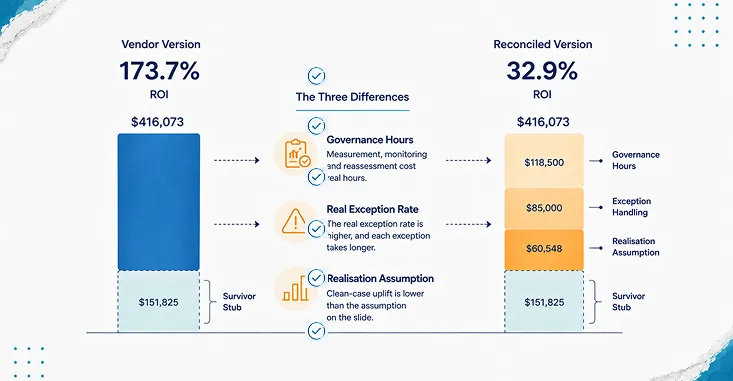


A vendor put a number in front of a finance director last spring: 82 percent of invoices would go straight through, untouched. Sixty thousand invoices a year, eleven minutes each by hand. The arithmetic on the slide came out at four hundred and sixteen thousand dollars of freed labour against a hundred and fifty-two thousand of annual cost. A hundred and seventy-four percent return.
The number was not dishonest. It was incomplete in three specific places, and each of the three maps onto one of the trends everybody is writing about this year. That is the useful way into intelligent automation: not as a list of capabilities, but as a list of things that each generate work someone has to absorb after go-live.
What intelligent automation actually is
Intelligent automation is the combination of rule-based automation, robotic process automation (RPA), machine learning models, and workflow orchestration, applied to a single business process end to end. RPA is software that drives existing applications the way a person would, through their screens and interfaces. Orchestration is the layer that decides what happens next and who gets involved.
The definition needs no citation because it is a description, not a claim. What needs a citation is the origin of the word everyone reaches for next.
Trend one: hyperautomation, and the discipline it was defined with
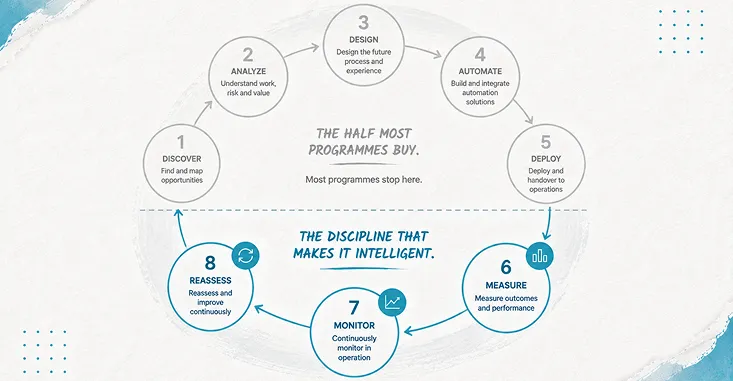
Gartner introduced hyperautomation as its first of ten strategic technology trends for 2020, in research published on 21 October 2019 by David Cearley, Nick Jones, David Smith, Brian Burke, Arun Chandrasekaran and CK Lu. The definition is more demanding than the way the word gets used now. Gartner described hyperautomation hyperautomation as the combination of multiple machine learning, packaged software and automation tools to deliver work, and specified that it refers “not only to the breadth of the pallet of tools, but also to all the steps of automation itself (discover, analyze, design, automate, measure, monitor and reassess).”
Read that list of steps again. Three of the eight are things you do after the automation is running: measure, monitor, reassess. Gartner also said plainly that “RPA alone is not hyperautomation.” So the term that gets used to mean more automation was defined to mean automation plus a measurement and reassessment loop. Most programmes buy the first half.
The reason this matters for the invoice model is that the vendor’s 82 percent touchless rate assumed the remaining 18 percent would still take eleven minutes each, the same as before. Exceptions do not work that way. When the clean cases leave the queue, what remains is the hard residue, and it takes longer per item than the blended average ever did.
Trend two: AI-assisted workflow, where the exception rate is the whole story
Rule-based automation fails loudly. A rule either matches or it does not. AI-assisted workflow fails quietly: it produces an output that is well-formed, plausible, and wrong, and nothing in the pipeline objects.
That is why the observed exception rate, not the touchless rate, is the number the business case turns on. In the invoice case the real figure after four months of production was 26 percent, not 18, and those exceptions averaged fourteen minutes each rather than eleven, because the residue was the awkward supplier formats and the partial deliveries.
Here is the whole model, and it is illustrative. Substitute your own figures; what is being shown is the shape of the calculation, not a price list.
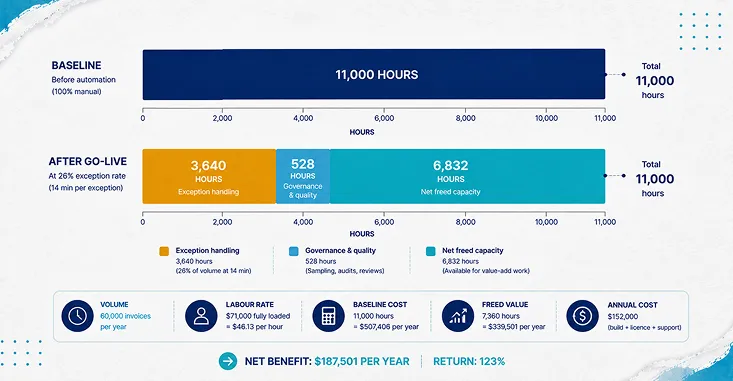
Sixty thousand invoices a year. Eleven minutes each by hand. Labour rate derived from a fully loaded cost of $71,000 for a processor, divided by productive hours rather than paid hours: 2,080 paid hours less 26 percent shrinkage for leave, training, sickness and non-productive time gives 1,539.2 productive hours, so $46.13 an hour. Baseline: 11,000 hours, or $507,406 a year.
After go-live, at a 26 percent exception rate and fourteen minutes per exception, exception handling consumes 3,640 hours. Freed hours: 7,360, worth $339,501 at the processor rate.
Annual cost: build of $210,000 amortised over a three-year life is $70,000, plus $58,000 of licence share and $24,000 of support and maintenance. Total $152,000. Those are plausible market rates for a programme of this size rather than quotes from a specific price list, and should be treated as such.
Then the part the vendor slide did not have, which is the subject of the next two trends.
Trend three: low-code and no-code, and the inventory nobody is keeping
Low-code and no-code platforms let people who are not developers build working applications. Gartner’s 2019 research called this democratisation of expertise and predicted it would accelerate through 2023, including “democratization of design (expanding on the low-code, no-code phenomena with automation of additional application development functions to empower the citizen-developer).” That happened.
What it produces is an asset class with no owner. The Open Web Application Security Project, a vendor-neutral non-profit, maintains a Top 10 for exactly this, and its ninth entry, asset management failures, describes the mechanism better than any vendor page will: citizen-developed applications “are prone to being forgotten or abandoned while remaining active and functional,” and useful internal applications “become widely shared within the organization, scaling rapidly in usage and dependency without the necessary business continuity measure expected of more standardized and essential systems such as having designated owners, IT monitoring, or a Service Level Agreement (SLA).”
Note what that is not. It is not a security-scare argument. It is an operations argument with a cost attached: something that is running, that people depend on, that nobody is named against. In the invoice programme there were 34 such assets by month four, and keeping an inventory current, with an owner name and a last-reviewed date against each one, took about nine hours per asset per year. 306 hours, at a reviewer rate of $67.57 an hour derived the same way from a $104,000 fully loaded cost.
The counter-metric here pairs naturally: count assets built alongside assets with a named owner and a review date inside the last quarter. The first number only goes up, which is what makes it useless on its own which is what makes it useless on its own.
Trend four: edge automation, and why the sample is not optional
Edge automation moves decisions closer to where the work happens. Gartner’s framing, again from the 2019 research, is that edge computing is “a computing topology in which information processing and content collection and delivery are placed closer to the sources, repositories and consumers of this information,” and that it “tries to keep the traffic and processing local to reduce latency, exploit the capabilities of the edge and enable greater autonomy at the edge.”
Greater autonomy at the edge is the phrase to sit with. Autonomy means decisions taken without a round trip to a system that logs them centrally. The operational consequence is that you lose the ability to reconstruct what happened from the middle of the stack, which is why the only reliable check on a decentralised automation is sampling its output.
The European Union’s AI Act, Regulation (EU) 2024/1689, makes the same point as a legal requirement for high-risk systems. Article 14 requires that such systems be designed so that they “can be effectively overseen by natural persons during the period in which they are in use,” and it names the failure mode explicitly: the people assigned oversight must be enabled “to remain aware of the possible tendency of automatically relying or over-relying on the output produced by a high-risk AI system (automation bias), in particular for high-risk AI systems used to provide information or recommendations for decisions to be taken by natural persons.” Whether or not invoice processing is high-risk under the Act, automation bias is not a legal category. It is a description of what happens to a reviewer looking at their four hundredth correct output.
Sampling is how you price it. Five percent of the touchless path, at six minutes per sampled item, is 222 hours a year.
What the four costs do to the number
Governance is 528 hours a year: 222 of sampling plus 306 of inventory work, at the reviewer rate, which is $35,676. That is 59.5 cents per invoice, and 10.5 percent of the value of the freed labour.
So the honest version of the vendor’s slide, at full realisation, is $303,825 of gross benefit against $152,000 of cost. Net $151,825, a 99.9 percent return. The vendor said 173.7 percent. Neither number is a lie about the arithmetic; the difference is entirely in what the exception rate really was and whether governance was priced at all.
Then the assumption that kills more business cases than any other. Freed hours are not saved money until somebody redeploys them. Realisation is the percentage of freed hours that actually convert. At 70 percent, which is a reasonable planning figure rather than a pessimistic one, gross benefit falls to $201,975 and net to $49,975. The return drops from 99.9 percent to 32.9 percent. Solve for the point where the programme stops paying: realisation of 55.3 percent. Below that it loses money regardless of how well the automation works.
Sensitivity. The most uncertain assumption in the whole model is the exception rate, so move it from 26 to 34 percent, which is plausible if supplier onboarding is uneven. At full realisation the return falls to 67.0 percent. At 70 percent realisation it falls to 10.2 percent, and net benefit is $15,432 on a $152,000 annual cost. The case is technically alive and practically not worth doing.
Breakeven. At 70 percent realisation, the exception rate at which the programme returns exactly nothing is 37.6 percent. That is the number to put in front of leadership, because it is measurable from week one and it tells them what has to stay true rather than asking them to trust that it will.
Cash timing, separately, because ROI and payback answer different questions. At full realisation the programme clears $18,485 a month after licence and support, so the $210,000 build pays back in 11.4 months. At 70 percent realisation it clears $9,998 a month and payback stretches to 21.0 months, with year one cash negative at $90,025. A programme can be genuinely worth doing and still need two budget years to prove it.
The first ninety days, which is where the number is either produced or fabricated
Most competitors write the practitioner’s version of this topic. The version that decides whether you get a real number is the vendor relationship in its first quarter, and it has almost nothing to do with the build.
Weeks one to two. Agree the unit of work in writing. Not “invoices,” which blends three-line utility bills with forty-line freight consolidations. One request type, one definition, one baseline measured before anything changes. If the baseline is measured after go-live it is not a baseline, it is a memory.
Weeks three to six. Name the system each number will come out of, and the person who runs the query. Exception rate from the orchestration layer, not the vendor’s dashboard. Handling time from the case management timestamps. If two systems can both produce the exception rate, pick one now, because at month four they will disagree by several points and the argument will be about tooling instead of about the process.
Weeks seven to ten. Start sampling. Fifty items from the touchless path, reviewed by someone who did not build the automation, scored against the same criteria a human processor would be scored against. This is the first point in the relationship where you find out whether the automation is right or merely finished.
Weeks eleven to thirteen. Produce the asset register. Every automation, every low-code app, every integration built during the programme, each with a named owner and a review date. If it takes more than a week to assemble, that is the finding.
None of this is a clause. It is a sequence, and its output is a number two parties can both stand behind at the first quarterly review.
Where PAteam fits
PAteam builds and runs intelligent automation for contact centre and back-office operations, mostly on RPA and CXone RPA and CXone, and increasingly with AI-assisted steps inside workflows that used to be entirely rule-based. The work that distinguishes a durable programme from a demo is unglamorous: exception design, traceability, and a named owner after go-live a named owner after go-live.
One pattern worth naming, because it recurs. A wholesale distribution business we support has its own development team; the value of bringing us in was not that we could build what they could not, it was that day-to-day automation maintenance stopped consuming their people, who moved onto the high-value exceptions instead. The saving was real and it was not a headcount saving. It showed up as a change in what the internal team spent its week doing, which is the kind of benefit that never survives a spreadsheet and is often the main one.
Where a programme is already live and drifting, the useful intervention is usually an implementation review rather than a rebuild an implementation review rather than a rebuild. Where nothing is live yet, one workflow assessment beats a roadmap one workflow assessment beats a roadmap.
Choosing among the options, in list shape
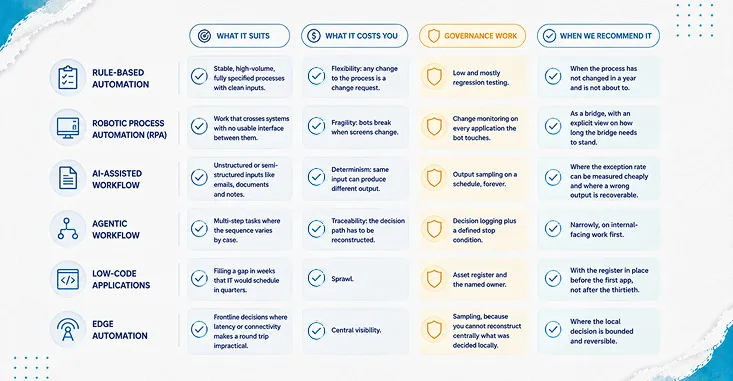
Each entry below follows the same four-part shape: what it suits, what it costs you, the governance work it generates, and when we would recommend it.
What makes automation stick
Conclusion
The four trends in every intelligent automation list this year are real, and each one moves work rather than eliminating it. Hyperautomation adds a measurement and reassessment loop that Gartner wrote into the definition and most programmes leave out. AI-assisted workflow converts loud failures into quiet ones, which is why the observed exception rate governs the business case. Low-code creates assets that outlive their builders’ attention. Edge automation trades central visibility for local speed, and sampling is the only thing that buys the visibility back.
In the invoice case the whole distance between 173.7 percent and 32.9 percent came from three things: the real exception rate, the governance hours, and the realisation assumption. None of them are technology questions.
So: what does your current automation contract say about who produces the exception rate, out of which system, and what happens to the business case if that number lands eleven points higher than the one on the slide?