A head of customer operations asked us this last quarter, almost as an aside: “If the summary writes itself in ten seconds, why is my after-call work only down by a third?”
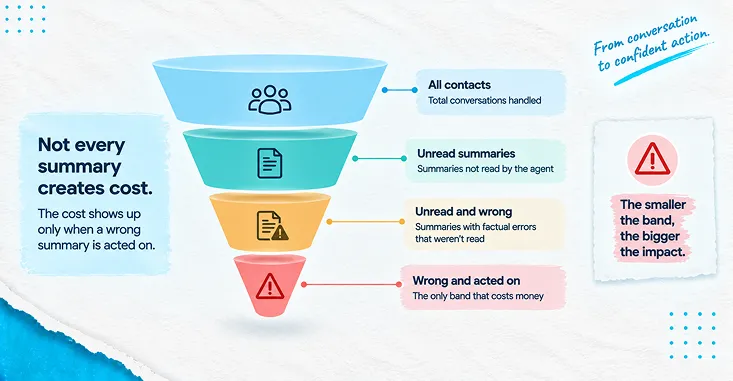
It is the right question and the answer is not a tuning problem. Automatic summarisation removes one task and adds two. Typing goes away. Reading arrives, and so does checking. Whether the trade is worth making depends on how long the summary is, how often it is wrong, and how many people actually read it before it becomes the record — and those three variables interact in ways that a demo will never show you, because in a demo the summary is always short, always right, and always read.
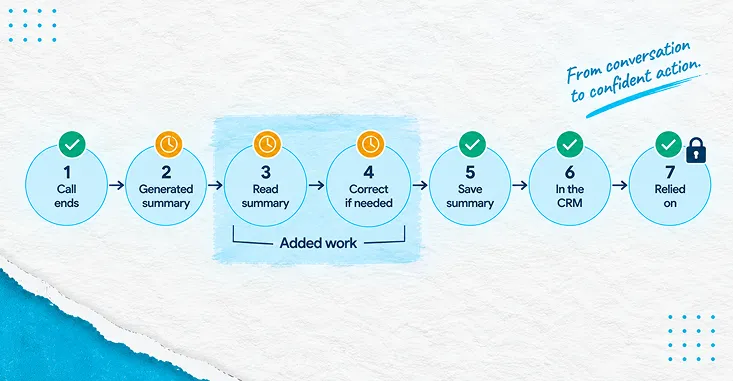
What follows is the journey of one summary, from the moment the call drops to the moment somebody downstream relies on it. Seven stages, each with its own failure mode, its own cost, and its own sampling test. The arithmetic sits in one place near the end, with the breakevens and one scenario where the whole thing loses money.
The seven stages, before we price any of them
A generated summary is not a document that appears. It is a small workflow with a human step in the middle of it, and the human step is the one nobody budgets for.
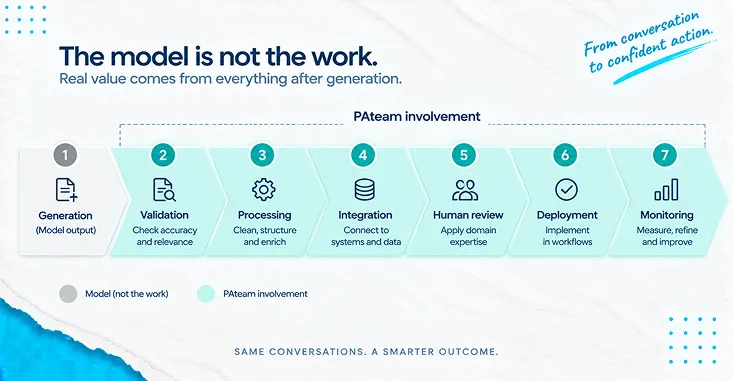
The stages are: the interaction ends and the platform generates text; the agent reads what was generated; the agent corrects it if it is wrong; the agent saves it, which is what closes the interaction; the saved text either reaches the system of record or does not; a later agent or a back-office colleague relies on it; and somebody, eventually, monitors whether the whole arrangement is behaving. Six of the seven are where the value is. Two of the seven are where the new cost is. One of them — the last — is where the regulator is.
That framing matters because the standard business case prices stage one and ignores stages two through four. This piece prices all of them.
Stage one — the platform generates text, within limits
Speech-to-text converts spoken audio into a written transcript. Summarisation compresses that transcript into something short and structured: why the customer made contact, what the agent did, what was agreed, and what happens next. Both are ordinary capabilities now, available inside contact-centre platforms and as standalone services. Neither needs defending.
What does need reading carefully is what the platform documentation says about the limits, because the limits are what your process has to absorb.
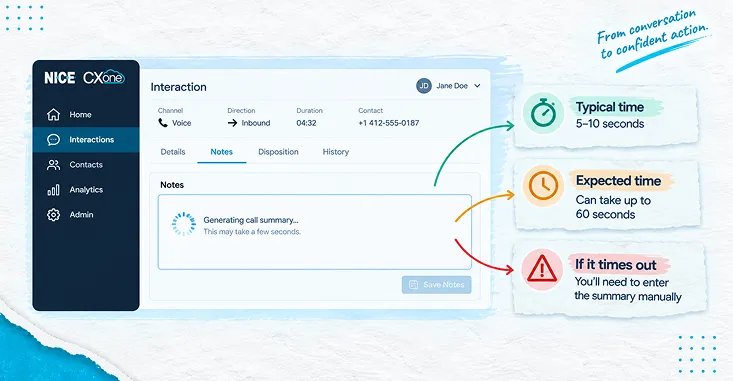
Taking the platform PAteam implements as the worked example, and noting the obvious interest — NICE is our platform partner, so treat this as a partner’s documentation rather than a neutral review — the states several things that shape the design directly. Summaries are “typically generated within 5 to 10 seconds after an interaction ends,” but the spinner in the agent’s Notes field “may remain active for up to 60 seconds — this is expected behavior,” and if nothing appears after sixty seconds “the request has timed out and agents can manually enter notes in the Notes field.” Summary length is configurable “between 40 and 250 words.” The feature works on voice and digital messaging channels and “does not currently support summarization for the email channel.”
Read those four facts together and a design constraint falls out that has nothing to do with model quality. You need a manual fallback path that agents are trained on and that quality assurance treats as a legitimate outcome rather than a defect, because the documentation tells you the timeout exists. And if a meaningful share of your contact volume is email, summarisation is not the automation that helps you there — a different one is, and pretending otherwise is how a programme ends up with a coverage problem it did not plan for coverage problem it did not plan for.
Stage two — somebody has to read it
Here is where the honest model departs from the vendor model. Typing a wrap-up note from memory takes real time. Reading a generated note also takes real time, and reading time scales with the setting an administrator picked in a configuration screen.
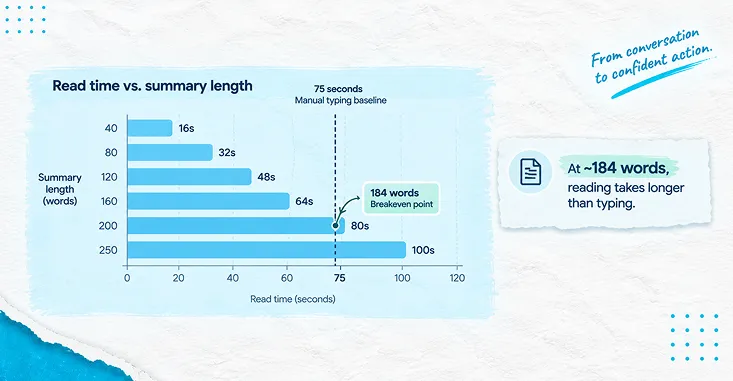
At an on-screen reading speed of two hundred words a minute, a forty-word summary costs twelve seconds to read and a two-hundred-and-fifty-word summary costs seventy-five. That is not a rounding error against a typing task of a minute or so. It is the whole margin.
Which produces the single most actionable finding in this piece: summary length is the variable your business case is most sensitive to, and it is the one variable nobody negotiates. It gets set once, during configuration, usually toward the generous end, because longer summaries look more thorough in a demonstration and demonstrations are where the setting gets chosen.
Stage three — sometimes the agent has to correct it
Generated summaries of conversations are wrong more often than the marketing suggests, and the research on this is specific enough to build a plan around.
In , presented at the 2022 Conference on Empirical Methods in Natural Language Processing, Wang and colleagues performed a fine-grained human analysis and report that “over 35% of generated summaries are faithfully inconsistent respective the source dialogues.”
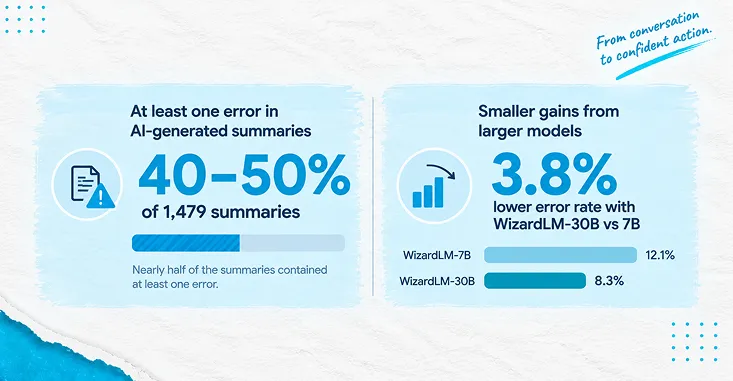
The more recent and more granular picture comes from , published at NAACL 2024 by a team at AWS AI Labs with collaborators at KAIST and Columbia. Its denominators are stated plainly, which is why it is worth citing at all: 1,479 topic-focused summaries comprising 3,966 summary sentences, generated by five different large language models across meeting and media-interview transcripts, with every sentence judged by human annotators. The findings that matter operationally are these three.
First, on the MeetingBank portion — transcripts of actual meetings, the closest analogue to a service conversation — the average share of summaries containing at least one main-topic factual error was 30.4 per cent, and across all the models evaluated except one, “approximately 40–50% of their summaries contain at least one factual inconsistency.”
Second, bigger models did not fix it. The paper notes that “WizardLM-30B’s error rate is only 3.8% lower than WizardLM-7B’s on MeetingBank” — a fourfold increase in parameters for a marginal change. If your remediation plan for accuracy is “wait for the next model,” that plan has already been tested.
Third, and most useful for configuration, the authors found no positive relationship between summary length and error count, reporting a Pearson correlation of 0.18 at p = 0.57. Cutting summary length does not make summaries more wrong. It just makes them cheaper to read. That is an unusually clean result: the lever that most improves your economics costs you nothing in accuracy.
Stage four — the agent saves it, and that is not optional
The platform documentation is explicit that “agents can modify the summaries if they want to change the text or add details” and that “the agent must save the summary to complete the interaction.”
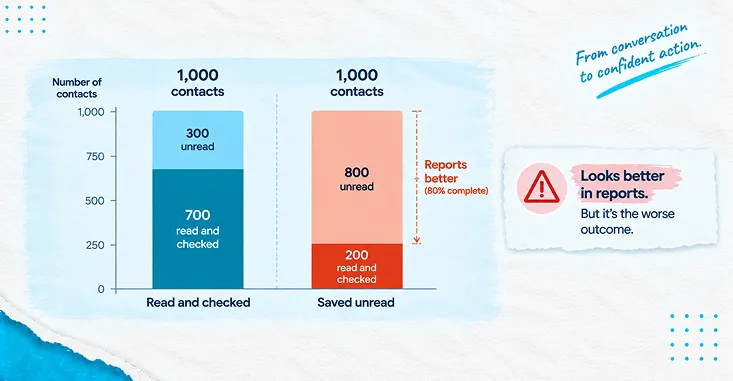
That sentence is doing more work than it looks like. It means the human step is structurally mandatory — the interaction does not close without it — and it also means the system cannot tell the difference between an agent who read the summary carefully and an agent who clicked save. Both produce an identical record. Both close the contact. Only one of them caught the error.
This is where the arithmetic gets uncomfortable, and where it stops flattering the project. If nobody reads, the measured after-call work saving is roughly two and a half times larger than if everybody reads. The version of this deployment that reports the best numbers is the version where the verification step has quietly stopped happening. The dashboard will not show you this. It will show you an improvement, and it will attribute it to the technology.
Stage five — the summary reaches the record, or it does not
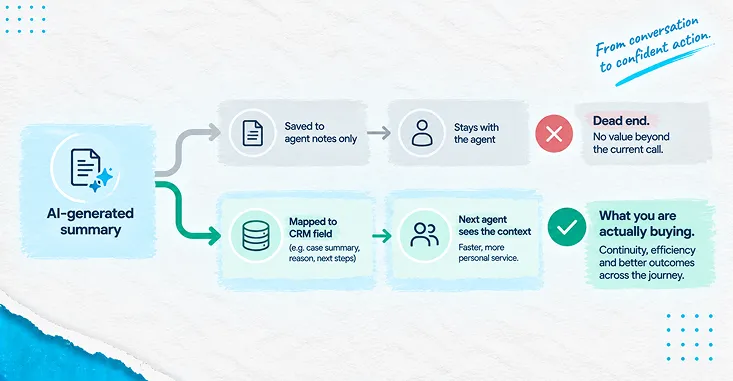
The same documentation carries a dependency that reframes what you are buying: “To save the data, you must configure Automated Summary (AutoSummary) to pass it to your CRM… Without a CRM integration, the generated summaries aren’t visible to other agents.”
So the feature, on its own, produces text in one agent’s notes panel. The handoff benefit — the next colleague not asking the customer to repeat themselves — is delivered by the integration and the field mapping, not by the summarisation. The documentation says as much: the integration requires “mapping a field from the agent application to the CRM.”
We ran an engagement with a homebuilding business that arrived describing its problem as data entry. The interesting part of that delivery was not the keystrokes removed. It was that once the information landed in the specific fields the downstream team already checked, that team stopped independently re-verifying the same handful of values, and the saving showed up two steps away from where the automation ran. The generalisable lesson is that the value of structured text is set by whether it lands where somebody already looks. Text in a notes panel nobody opens is a cost with no offsetting benefit, and that is a design decision, not a platform limitation a design decision, not a platform limitation.
Stage six — somebody downstream relies on it
The platform documentation is explicit that “agents can modify the summaries if they want to change the text or add details” and that “the agent must save the summary to complete the interaction.”
That sentence is doing more work than it looks like. It means the human step is structurally mandatory — the interaction does not close without it — and it also means the system cannot tell the difference between an agent who read the summary carefully and an agent who clicked save. Both produce an identical record. Both close the contact. Only one of them caught the error.
This is where the arithmetic gets uncomfortable, and where it stops flattering the project. If nobody reads, the measured after-call work saving is roughly two and a half times larger than if everybody reads. The version of this deployment that reports the best numbers is the version where the verification step has quietly stopped happening. The dashboard will not show you this. It will show you an improvement, and it will attribute it to the technology.
Stage seven — somebody is accountable for the arrangement
Two regulatory points, both from the UK regulator’s current text rather than from commentary about it, and both stated as the position they actually are.
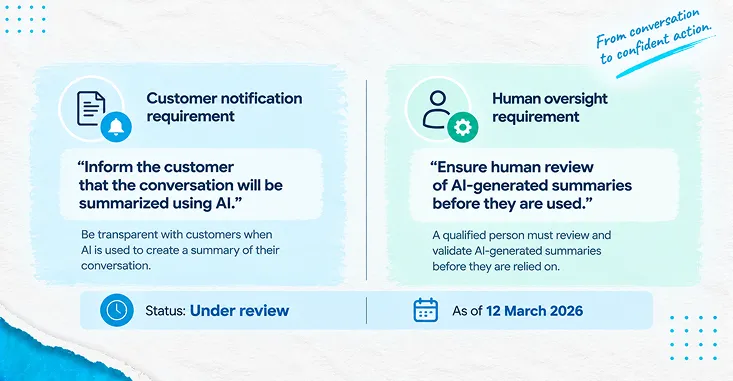
On the recordings and transcripts themselves, the Information Commissioner’s Office guidance on states that “it is not usually proportionate to monitor or record the content of calls in all cases,” while accepting that you “could monitor business calls if it is necessary to provide evidence of business transactions, or for training or quality control purposes.” It also addresses the customer side directly: monitoring calls “inevitably involves collecting information about people who make calls to, or receive calls from the organisation,” you “must tell these people that you are recording the call and why,” and “a recorded message is good practice.” The guidance further notes that recordings may be disclosed in response to a subject access request, and that workers should know this.
On the automated part, the ICO’s companion page on is the one to read before summaries or their derived scores reach a performance conversation. Where an automated system supports a decision rather than making it, the guidance requires that the people deciding are “involved in checking the system’s recommendation and should not just routinely apply the automated recommendation to workers,” that their involvement is “actively involved and not just a token gesture,” with “meaningful influence on the decision, including the ‘authority and competence’ to go against the recommendation,” and that they are “weighing-up” and “interpreting” the recommendation rather than passing it along. It also requires that you “carry out regular checks to make sure your systems are working as intended.”
Both pages carry a dated status line: “Due to changes made by the Data (Use and Access) Act, this guidance is under review and may be subject to change.” That is worth stating rather than hiding, because it tells you something useful about how to write your own documentation — record the reasoning behind your lawful basis and your review design, not just the conclusion, so that the reasoning survives the guidance being reissued. This is a position that needs confirming with your own counsel against your jurisdiction and your recording purposes; it is not legal advice.
The arithmetic, in one place
This model is illustrative. The structure is what transfers; every input should be replaced with your own before anyone acts on it.
An operation handling forty thousand voice and digital messaging contacts a month, at a loaded agent cost of twenty-eight euros an hour. Typing a wrap-up note from memory takes seventy-five seconds. Reading proceeds at two hundred words a minute. Correcting a summary found to be wrong takes forty-five seconds. The mandatory save takes four seconds on every contact. Summary length is configured at a hundred and twenty words. The error rate is thirty-five per cent, taking the EMNLP 2022 figure as the conservative end of the published range.
With every summary read and every error corrected, the new per-contact cost is thirty-six seconds of reading, plus 15.75 seconds of expected correction time, plus the four-second save. That is 55.75 seconds against a seventy-five-second baseline: a net saving of 19.25 seconds per contact, or 213.89 agent hours a month, or 5,988.89 euros a month and 71,866.67 euros a year.
That is a real result. It is also 74 per cent smaller than the figure you get by pricing only the typing that disappeared.
Sensitivity to configured summary length, everything else held at the base case:
- 40 words — twelve seconds of reading — net saving 43.25 seconds per contact, 13,455.56 euros a month
- 80 words — twenty-four seconds — net saving 31.25 seconds, 9,722.22 euros a month
- 120 words — thirty-six seconds — net saving 19.25 seconds, 5,988.89 euros a month
- 160 words — forty-eight seconds — net saving 7.25 seconds, 2,255.56 euros a month
- 200 words — sixty seconds — net loss of 4.75 seconds per contact, 1,477.78 euros a month worse than typing
- 250 words — seventy-five seconds — net loss of 19.75 seconds per contact, 6,144.44 euros a month worse than typing
The last two rows are the honest failure case and they are inside the vendor’s own supported configuration range. Two hundred and fifty words is not an abuse of the product; it is the documented maximum. Configured there, with verification actually happening, this deployment costs more than the manual process it replaced.
Sensitivity to error rate, at a hundred and twenty words with full verification:
- 10 per cent — net saving 30.50 seconds, 9,488.89 euros a month
- 20 per cent — net saving 26.00 seconds, 8,088.89 euros a month
- 35 per cent — net saving 19.25 seconds, 5,988.89 euros a month
- 50 per cent — net saving 12.50 seconds, 3,888.89 euros a month
- 70 per cent — net saving 3.50 seconds, 1,088.89 euros a month
- 100 per cent — net loss of 10.00 seconds, 3,111.11 euros a month
Three breakevens. Put these on the slide instead of the point estimate, because they tell leadership what has to be true rather than asking them to trust that it is.
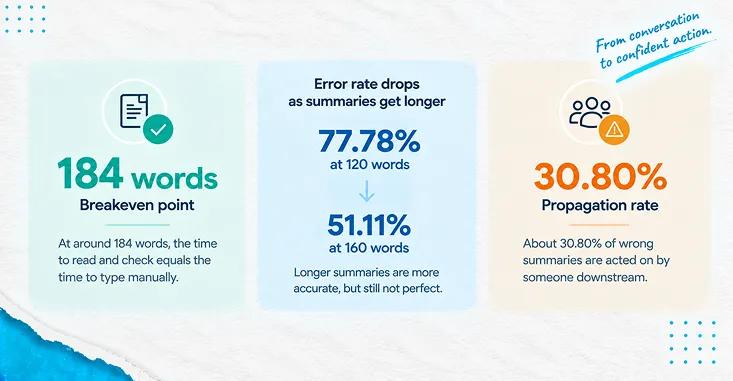
The length ceiling is 184.17 words. Above that, at a thirty-five per cent error rate with verification happening, generated summaries cost more to consume than manual notes cost to write. Your configuration screen permits 250.
The error-rate ceiling is 77.78 per cent at a hundred-and-twenty-word summary, which sounds like ample headroom against the published thirty-five to fifty per cent. At a hundred and sixty words it collapses to 51.11 per cent, which is inside the range TofuEval measured. The tolerance you have for model error is set by the length you configured — the two variables are not independent, and treating them as separate decisions is how a business case survives review and then fails in production.
The propagation ceiling is 30.80 per cent. Below that rate of uncorrected errors turning into repeat contacts, skipping verification genuinely is cheaper on the numbers. Above it, the unverified operation is the more expensive one. Nobody measures this rate, which means nobody knows which side of it they are on, which means the flattering interpretation wins by default.
The counter-metric, and why edit rate alone tells you nothing
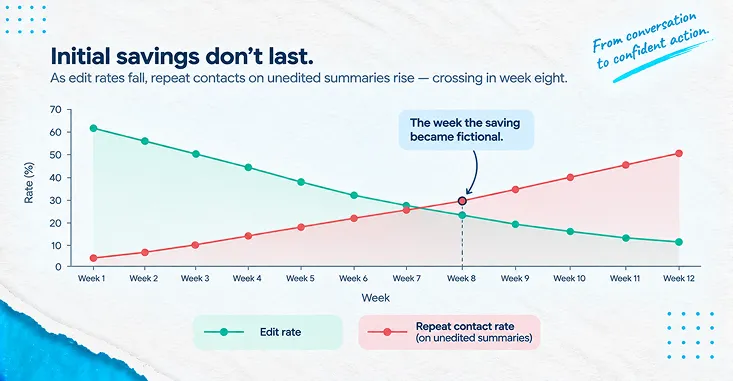
Track edit rate — the share of generated summaries an agent changed before saving. Then notice that it is ambiguous in both directions.
A near-zero edit rate is consistent with a model that is almost always right. It is equally consistent with an agent population that has learned to click save. A high edit rate is consistent with a model that is frequently wrong. It is equally consistent with a team that is doing the job properly.
So it has to be paired, and the pairing is what makes it informative: edit rate read against the repeat-contact rate on summaries that were saved unedited. If edits are near zero and unedited summaries produce repeat contacts at the same rate as edited ones, the model is genuinely good and you can safely shorten the summary and bank the reading time. If edits are near zero and unedited summaries produce measurably more repeat contacts, verification has stopped happening and your reported saving is an artefact of the thing you were supposed to be checking.
Neither number means anything alone. Together they distinguish a working deployment from one that has quietly turned into a rubber stamp, and no dashboard ships with them paired. Somebody has to build that view deliberately, which is the same lesson as counting the wrong things anywhere else in an automation estate counting the wrong things.
Write change request one before you sign
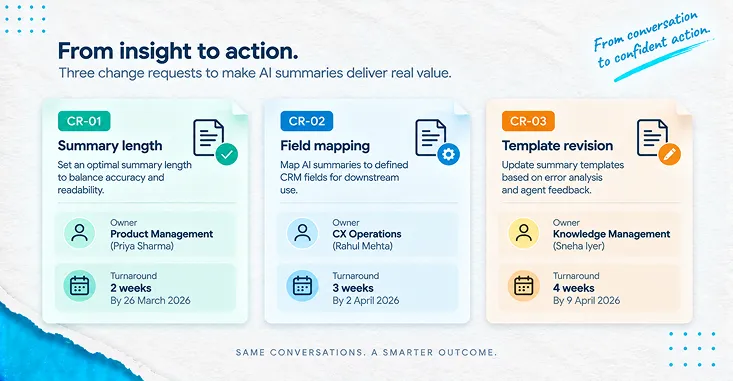
Most procurement conversations about this feature concern the licence. The more useful document is the first change request, drafted before go-live, because you already know what is going to change and you can price it while you still have leverage.
Three things change after go-live, predictably, in every deployment of this kind.
Write all three as named artefacts with owners and turnaround times, and write the escalation route for when the summary is systematically wrong on a particular contact type rather than randomly wrong across all of them — because the fix for the first is a template or a routing change and the fix for the second is not something you can fix at all. A contract that does not distinguish between those two situations will treat both as a support ticket, and getting this wrong is one of the more expensive ways a competent implementation still ends badly still ends badly.
If you build it on APIs instead
Some teams need custom output formats, unusual language coverage, or a pipeline that spans several systems, and reach for a transcription and analytics service directly rather than a platform feature.
That is a legitimate route, and the constraints to design against are in the documentation rather than in the marketing. The states that “Call Analytics only supports two-channel audio, where an agent is present on one channel and a customer is present on a second channel” — which is an assumption about your telephony estate, not about your AI, and one that fails quietly in mixed-channel or conferenced calls. Post-call jobs are queued and “you’re limited to 100 concurrent Call Analytics jobs.” Input files “cannot be greater than 500 MB and must be less than 4 hours,” dropping to two hours where audio frequency exceeds 8 kHz. And the one that catches teams retrospectively: “If using categories, you must create all desired categories before starting a Call Analytics transcription. Any new categories cannot be applied to existing transcriptions.” Your taxonomy is a design decision made before ingestion, not an analysis you can run later over history.
Region availability also matters for data-residency commitments. In the documented region table, several regions including Mumbai and Singapore support post-call analytics only, not the real-time variant, which constrains what an agent-assist ambition can look like in those geographies.
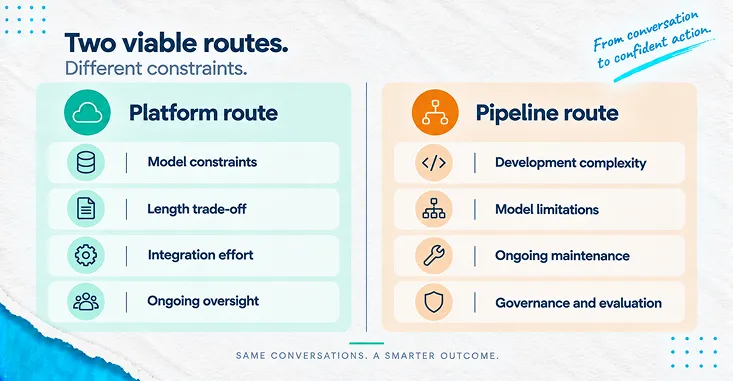
Choosing between the platform route and the pipeline route is genuinely a trade rather than a ranking, and the same trade shows up across the wider automation portfolio the wider automation portfolio.
What good looks like on the page
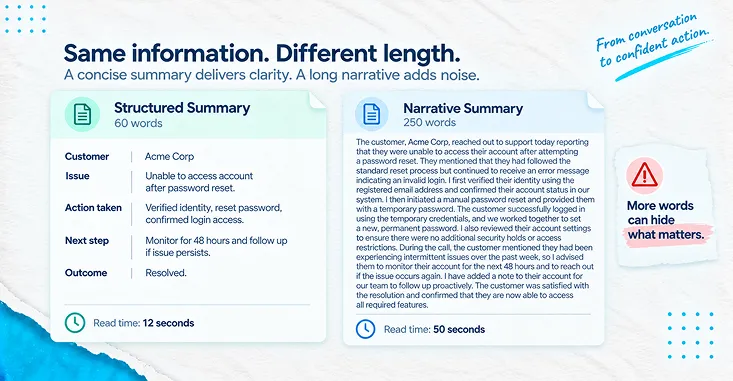
A summary that earns its reading time is short, structured, and maps to fields somebody already checks. Something closer to this:
Reason for contact: delivery delay, order reference recorded. Customer’s stated goal: a revised delivery date and written confirmation. Actions taken: order status checked, delay confirmed as stock, expedited shipping offered. Outcome: expedited option accepted. Follow-up: confirmation email sent, case set to pending delivery. Risk note: customer requires delivery before Friday.
Roughly sixty words. Eighteen seconds to read. Six labels, each of which corresponds to a field in the system of record. No paragraphs, no restatement of what the customer said, no summary of the summary. The version of this that runs to two hundred and fifty words is not more thorough — it is the version that loses money on the arithmetic above.
Where PAteam fits
Our work on this is not the model and not the licence. It is the six stages either side of the generation step.
That means choosing the contact types where structure makes verification cheap, and saying which ones to leave alone. Setting the summary length against your measured reading speed rather than against a default. Mapping to the fields the downstream team genuinely reads, which requires sitting with that team rather than with the project sponsor. Building the paired view of edit rate against repeat-contact rate on unedited summaries, because it will not exist otherwise. Designing the manual fallback for the documented timeout so it is a supported outcome rather than an exception. And writing the sampling routine that a reviewer can execute in an hour a week, along with the human-oversight record that the ICO guidance expects.
We are a certified CXone implementation partner certified CXone implementation partner and we also build pipeline deployments where that is the better fit. The judgement we are paid for is which of the two your estate should carry, and where the summary has to land for anyone to benefit from it. The same discipline applies where the output feeds a regulated process a regulated process or where sentiment and other derived signals sit alongside it derived signals sit alongside it.
What to do with this
Do not start with a business case. Start with an artefact.
Write a single page that states four numbers and names an owner for each: the summary length you have configured in words; the reading time that length implies at your operation’s measured on-screen reading speed; the share of summaries your agents edited before saving last month; and the repeat-contact rate on the summaries they did not edit. Then put the three breakevens from this piece underneath them — 184 words, the error-rate ceiling at your configured length, and 30.80 per cent propagation — and mark which of your four numbers you cannot currently produce.
That page takes an afternoon and it is worth more than a quarter of dashboard reporting, because the numbers you cannot fill in are the ones your business case is silently assuming. If you can produce all four and they sit on the right side of the breakevens, you have a working deployment and you should shorten the summary and bank the difference. If you cannot produce the fourth one, you do not yet know whether the saving you are reporting is real.
FAQs
References
NICE CXone, Automated Summary (AutoSummary) documentation. Read in full at source. Cited for the configurable summary length range of 40 to 250 words, the typical five-to-ten-second generation time, the spinner behaviour and sixty-second timeout with manual fallback, the requirement that the agent must save the summary to complete the interaction, the CRM pass-through dependency and the statement that without a CRM integration summaries are not visible to other agents, the field-mapping requirement, the transfer behaviour, and the exclusion of the email channel. NICE is PAteam’s platform partner and this is a vendor documentation source, disclosed as such; it is cited for stated product limits rather than for performance claims.
Bin Wang, Chen Zhang, Yan Zhang, Yiming Chen and Haizhou Li, “Analyzing and Evaluating Faithfulness in Dialogue Summarization”, EMNLP 2022, pages 4897–4908, DOI 10.18653/v1/2022.emnlp-main.325. Only the abstract is readable at this URL; the full text is available as a separate PDF that was not read. The single figure used here is taken from the abstract as published: “over 35% of generated summaries are faithfully inconsistent respective the source dialogues.” No other claim in this piece rests on this paper.
Liyan Tang, Igor Shalyminov, Amy Wing-mei Wong and colleagues, “TofuEval: Evaluating Hallucinations of LLMs on Topic-Focused Dialogue Summarization”, NAACL 2024, full LaTeXML text read at source including Table 2 and the methodology section. Cited for the stated denominators of 1,479 summaries and 3,966 summary sentences across two dialogue datasets and five models with human sentence-level annotation; for the finding that approximately forty to fifty per cent of summaries from all evaluated models except GPT-3.5-Turbo contain at least one factual inconsistency; for the 30.4 per cent average summary-level main-topic error rate on MeetingBank; for the observation that WizardLM-30B’s error rate is only 3.8 per cent lower than WizardLM-7B’s on MeetingBank; and for the absence of a positive length-to-error correlation at Pearson 0.18, p = 0.57.
Information Commissioner’s Office, “Specific data protection considerations for different ways or methods of monitoring workers”. Read at source. Cited for the proportionality position on recording call content, the accepted purposes of evidencing transactions and training or quality control, the obligation to inform callers and the recorded-message good practice, and the subject-access disclosure point. The page carries the dated status line “Due to changes made by the Data (Use and Access) Act, this guidance is under review and may be subject to change,” quoted in the body for that reason.
Information Commissioner’s Office, “What do we need to do if we use monitoring tools that use solely automated processes?”. Read at source. Cited for the human-oversight requirements applying to decision-supporting tools: that reviewers must check rather than routinely apply recommendations, that involvement must not be a token gesture, that reviewers need the authority and competence to go against the recommendation, and that regular checks must confirm systems are working as intended. Carries the same Data (Use and Access) Act review notice.
Amazon Web Services, Amazon Transcribe Call Analytics developer documentation. Read at source. Cited for the two-channel audio requirement, the hundred-concurrent-job limit on post-call analytics, the 500 MB and four-hour input limits with the two-hour limit above 8 kHz, the requirement that categories exist before transcription begins and cannot be applied retrospectively, and the regional availability pattern in which several regions including Mumbai and Singapore support post-call analytics only.